
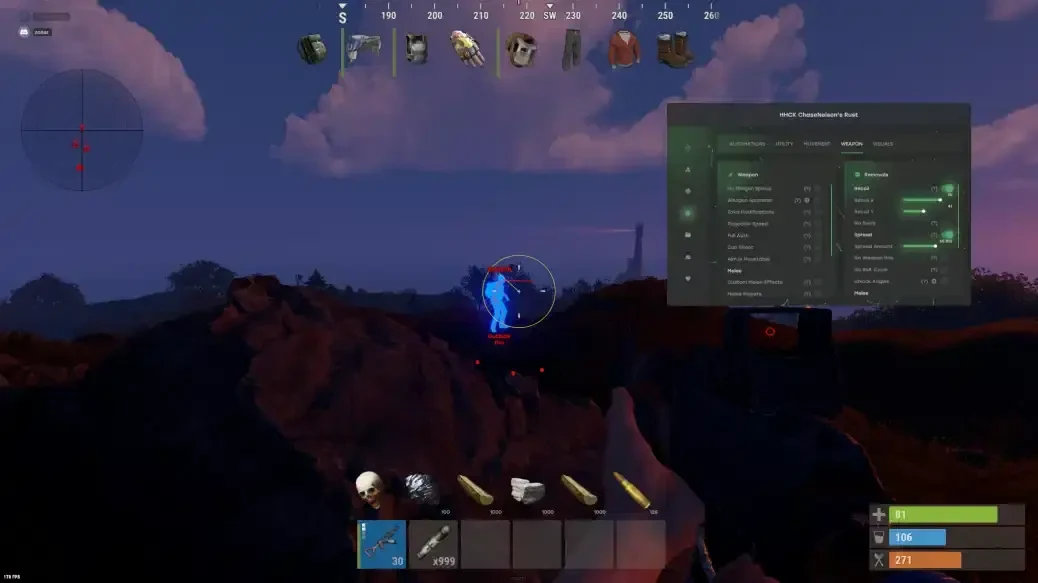


USB REQUIRED
AIM FEATURES
- Aimbot: Snaps onto your target(custom hotkey)
- High Grenade Prediction: Forces prediction to find a valid point from a higher angle.
- Use Vischeck: Only targets visible players.
- Use Smoothing: Humanizes the aimbot.
- Autofire: Automatically shoots when the target is hittable.
- Hit Chance: Makes some shots miss (only with PSilent, has slider for %).
- Keep Target: Keeps the target locked while holding the hotkey, even if out of FOV.
- Target Saved Position: Targets your current saved position on the map.
- PSilent: Curves projectiles towards the target(custom hotkey)
- Aimbone: Choose from a range of bones to aim at (Head, Neck, Spine, Lower Spine, Hitscan, Hitscan Priority).
- Secondary Aim Features:
- Smooth: Customizable smoothing value.
- Secondary Aimbone: Choose a secondary bone for aiming.
- Secondary Priority: Set priority for the secondary aim bone (Head, Neck, Spine, Lower Spine, Pelvis).
EXPLOIT FEATURES
- Legit Bullet TP: Decreases projectile size to seem more legit.
- Custom Projectiles: Makes projectiles hit if fired near the target (larger on mounted players).
- Behind Wall Calculations: Automatically calculates where PSilent should target behind objects.
- Heli Magic: Expands the helicopter hitbox.
- Desync On Keypress: Activates desync while pressing aim key.
- Bone Override: Overrides hitbone to a selected bone.
- Heli Rotor Override: Overrides hitbone to target the weakspots of the helicopter.
EXPLOIT MODIFICATIONS
- Override Bone: Choose override bone (Head, Chest, Hand, Foot, Rand, Rand NoHead).
- Hit Material: Select projectile material (Generic, Glass, Metal, Wood, Flesh, Dirt, Snow).
- Pierce Hitbone: Choose hitbone for projectiles (Head, Chest, Hand, Foot, Rand, Rand NoHead).
AIM VISUAL FEATURES
- Crosshair: Customizable crosshair with color options.
- FOV: Field of View with color settings.
- Predicted Marker: Draws where you need to aim to hit the target.
- Target Snapline: Draws a snapline to the target.
- Simulate Projectile: Draws where the projectile will land.
VISUAL MODIFICATIONS
- Crosshair Types: Choose from Cross, Thick Cross, or Dot.
- Fov Value: Adjustable FOV size for aimbot.
PLAYER ESP FEATURES
- Scientist: Toggle NPC visibility with color customization.
- Name: Display player names.
- View Direction: Draws the direction in which the player is looking.
- Distance: Show distance to players.
- TeamID: Display Team IDs.
- Skeleton: Show player skeleton with adjustable thickness.
- Box: Display corner box around players.
- HeldItem: Show held item for players.
- Hotbar Options: Toggle hotbar, clothing, parenting, use icons, and friendly/NPC/sleeper options.
- Players: Toggle player ESP with customizable color customization.
PLAYER MODIFICATIONS
- Online Sleeper. Only draw a sleeping player if he is connected to the server.
- Team/Enemy: Toggle ESP for teammates and enemies with color customization and hotkey.
- Sleeping. Toggle ESP for sleeping players with color customization.
- Wounded/Dead: Toggle ESP for wounded or dead players with color customization.
- Dead: Draw dead players that have not respawned.
- Safezone: Toggle ESP for safezone players with a color customization.
- OOF: Draws indicators for players out of FOV.
- Outside: Draw a indicator that a player is outside.
- Player Chams: Enable player chams with various material options (e.g., Lightning, YellowGlow, Fire, etc.).
- Viscolor: Customize visibility color.
- Cham Options: Customize chams for Friendly and NPC chams.- Cham Colors: Adjust cham colors when selecting specific materials.
- Disable Player Culling: Disables culling for players.
- Text Spacing: Adjust spacing for player text.
- Player Distance: Set the distance at which players are drawn.
- NPC Distance: Set the distance at which NPCs are drawn.
RADAR MODIFICATIONS
- Players Length
- NPC Length
- NPC Thickness
- Player Thickness
- Entity Circle Size
- Radar Size
- Player Circle Size
- NPC Circle Size
OTHER
- Scientist Corpse
- Animal Corpse
- Material: Choose the material type for Other chams (e.g., Lightning, LightGlow, Flame, etc.).
- All of these have adjustable color settings.
- All of these have adjustable distance.
- Dropped Items
- Player Corpse
- Backpack
- Distance: Adjusts the draw distance for dropped items.
- Item Category: Choose categories for dropped items (e.g., Weapon, Construction, Items, Resources, etc.).
- Other Chams: Enables chams for other entities.
- Dropped Weapons
- Distance: Adjusts the draw distance for dropped weapons.
ENEMY OPTIONS
- Lists only players with an "Enemy" status.
- Similar to Friend Options, allows refreshing, copying Steam link, and setting status.
PLAYER PREVIEW
- Draws a preview where you can adjust the text positions for the player.
ORE
- Metal Ore
- Sulfur Ore
- Stone Ore
- Wood Pile
- All of these have adjustable color settings.
- Farming Tool Check: Automatically checks if you have the required tool for farming ore/wood, and only displays the ESP if the tool is out.
ORE MODIFICATIONS
- Ore Chams
- Node Path: Draws a line to the closest ore enabled in ESP.
- Node Distance: Adjusts the draw distance for ores.
- Material: Choose the material type for Ore chams (e.g., Lightning, LightGlow, Flame, etc.).
COLLECTIBLES
- Hemp
- Stone
- Metal
- Sulfur
- Wood
- Diesel
- Berry Selection: Select from various berries (e.g., BlackBerry, BlueBerry, etc.) to enable ESP.
- Collectible Distance: Adjusts the draw distance for collectibles.
- All of these have adjustable color settings.
FOOD
- Corn
- Mushroom
- All of these have adjustable color settings.
- Pumpkin
- Potato
FOOD CHAMS
- Food Distance: Adjusts the draw distance for food items.
- Food Chams: Enables chams for food items.
- Material: Choose the material type for Food chams (e.g., Lightning, LightGlow, Flame, etc.).
WORLD
- Ambient Mode: Choose between "Flat" or "Trilight" modes.
- Ambient Multiplier: Adjust ambient light intensity.
- Aspect Ratio: Modify screen aspect ratio.
- Dayhack: Modify the current time of day.
- Day Value: Set the day value between 0 and 24.
- Ambient: Modify ambient light for better visibility in dark places.
- Aspect Value: Adjust the aspect value.
- Bright Stars: Make the stars brighter.
- Sky Changer: Modify the sky color.
- Point Of Interest: Automatically generates a marker on the map at your saved position.
- Battlemode: Disables every item ESP on keypress.
- Disable ESP Map: Disables all ESP when the in-game map is open.
- All of these have adjustable color settings.
- Save House: Enables ESP for your last saved house position.
- Raid Time: Adjusts the time for raid visuals.
- Save Position: Enables ESP for your last saved position.
- Raids: Enables ESP for raids from any distance.
- All of these have adjustable color settings.
- Clear Position: Clears your saved position.
- All of these have adjustable color settings.
- Clear House: Clears your saved house position.
RADAR
- EnableRadar
- Draw Cross
- Adjustable color settings for the radar circles.
- Adjustable color settings for the radar background.
- Draw Background
- Draw Direction: Displays the direction on the radar.
- Adjustable color settings for the radar cross.
- Draw Scientist
- Draw Other Entities
- Draw Text
- Draw Circles
INGAME RADAR
- Ingame Map Players: Displays players on the ingame map when pressing 'G' or the ingame map hotkey.
- Ingame Map Scientist
- Show Ingame Radar Text
- Show Ingame Radar Direction
INGAME RADAR SLIDERS
- Map Circle Size
- Entity Map Circle Size
VISUALS
- VisibleColor: Color for visible hand chams.
- View Model Chams: Draws chams on your hand/weapon.
- NonVisibleColor: Color for non-visible hand chams.
- Model Material: Choose material type for your weapon (e.g., Lightning, LightGlow, Flame, etc.).
- ChamColor: Color for hand chams (if ColorPicker is selected).
FRIEND OPTIONS
- Lists only players with a "Friendly" status.
- Allows actions like refreshing player list, copying Steam link, and setting custom status.
AUTOMATIONS 2
- Stack Items: Automatically crafts items from a dropdown selection(custom hotkey)
- Stack Options: Selects items to stack (e.g., Metal, Wood, Stone).
- Auto Loot: Automatically loots containers based on selected items(custom hotkey)
- Silent Loot: Loots containers without UI showing.
- Lootables: Items that can be looted (e.g., Weapons, Resources, Ammo).
- Refill Jackhammer: Automatically refills the jackhammer when near a workbench(will swap it out for a new one if its broken fully)
- Keep In Handcuffs: Keeps players mounted in handcuffs and resets their timer.
- Auto Lock: Automatically locks any unlocked codelocks nearby(custom code input)
- Cancel Crafting: Automatically cancels crafting items(custom hotkey)
- Steal Players: Automatically mounts players to your vehicle nearby.
- Instant Handcuff Release: Instantly uncuffs the player when handcuffed.
- Auto Auth: Automatically auths nearby codelocks(custom code input)
- Spam Handcuffs: Emits a noise when the local player has handcuffs on.
- Reset Crafting: Resets crafting timers.
- Drop Inventory: Automatically drops the entire inventory when the hotkey is pressed.
- Steal Unlocked: Steals codelocks by changing the code when another player unlocks it.
- Drop Container: Automatically drops items in the container you're looting when the hotkey is pressed.
PLAYER LIST
- Displays a list of players based on search criteria and player status.
- Search bar at the top to filter players by name, Steam ID, or team ID.
- Assign players based on "Neutral", "Friendly", or "Enemy" status dropdown.
DEPLOYABLES
- TC Options: Select various display options for the Cupboard (e.g., HealthBar, Upkeep, ShowID).
- RF Receiver
- Sleeping Bag
- Large Battery
- RF Broadcaster
- Tier 3 Workbench
- Tier 2 Workbench
- Deployable Chams: Enables chams for deployables.- Material: Choose the material type for deployable chams (e.g., Lightning, LightGlow, Flame, etc.).
- Deploy Distance: Adjusts the draw distance for deployables.
- All of these have adjustable color settings.
- HBHF Sensor
- Seismic Sensor
- Recycler
- Cupboard
- Stashes Unhidden
- Local Stashes: Saves the position of the stash you're looking at and stores it in your config.
REMOVALS
- Fov Changer: Modify the field of view (FOV).
- Remove Layers: Remove specific layers to see through them.
- Remove Flash: Remove flashbang flash effect.
- Remove Grass: Remove grass (boosts FPS).
- Fov Value: Adjust the FOV value.
- Current Layers: Clutter, World, Water, Terrain, Construction, Tree.
- No Smoke: Remove smoke effect and overlay.
CONFIGURATION
- Load Config: Choose which config to load from the list:
- Extra Config
- Extra Config 3
- LOAD Button: Load the selected config. The corresponding configuration will be applied, and a success notification will be displayed.
- Legit Config
- Extra Config 1
- SAVE Button: Save the selected config and a success notification will be displayed.
- Extra Config 2
- Rage Config
- SemiRage Config
SETTINGS
- Menu Key: Bind the hotkey for the menu.
- Font Settings:
- Player Font Size: Select the desired font size (Tiny, Extra Small, Small, Medium, Large, Extra Large).
- Configuration Status: Displays which configuration is currently loaded.
- Current Font: Choose between fonts.
- Menu Scale: Adjust the menu scale between 100% and 150%.
- Warnings Font Size: Select the font size for warnings (Tiny, Extra Small, Small, Medium, Large, Extra Large).
- Entity Font Size: Select the font size for entities (Tiny, Extra Small, Small, Medium, Large, Extra Large).
ANIMALS
- Stag
- Horse
- All of these have adjustable color settings.
- Boar
- Wolf
- Bear
- Shark
- All of these have adjustable distance.
TRAPS
- AutoTurret
- Turret Warnings: Enables warnings for nearby turrets.
- Tuncan Alarm
- Flame Trap
- Gun Options: Select display options for Gun Traps (e.g., HealthBar).
- Adjustable color settings for Flame Traps.
- Flame Options: Select display options for Flame Traps (e.g., HealthBar).
- Landmines
- Trap Chams
- All of these have adjustable distance.
- Turret Options: Select various display options for Auto Turrets (e.g., HealthBar, WeaponName).
- Gun Trap
- Snap Trap
- Samsite
- Sam Options: Select display options for Samsites (e.g., HealthBar, HideDefender).
- Material: Choose the material type for trap chams (e.g., Lightning, LightGlow, Flame, etc.).
- All of these have adjustable color settings.
AUTOMATIONS
- Auto Reload Bait: Automatically reloads bait in the rod.
- Auto Loot Rods: Automatically loots a rod from the box when needed.
- Auto Deposit Broke Rods: Automatically deposits broken rods.
- Auto Deposit Fish: Automatically deposits fish into selected boxes.
- Auto Collect: Automatically collects entities.
- From Grade: Chooses the starting upgrade tier.
- Auto Drink: Automatically drinks when a water bottle or jug is out.
- Auto Upgrade: Automatically upgrades the building you are looking at.
- Auto Cast Rod: Automatically casts the rod.
- Spam Torch: Automatically toggles the torch on and off instantly.
- Auto Reel Fish: Automatically reels the fish in for you.
- Auto Heal: Automatically heals when health is low.
- Collect Options: Allows selection of collectable items (e.g., Hemp, Stone, Metal, etc.).
- Visualize Tension: Displays the tension of the fishing line(can be moved)
- To Grade: Chooses the destination upgrade tier.
- Legit Mode: Allows for slower, more legitimate fishing.
- Auto Reply: Automatically responds to chat messages(requires API access)
- Auto Eat: Automatically eats collectable entities.
WEAPON REMOVALS
- Spread: Modifies projectile spread.
- No Weapon Bob: Removes weapon bob.
- No Melee Slowdown: Removes melee slowdown when running and hitting.
- Fast Bow: Instant bow shot on left mouse button press.
- Instant Charge: Instantly charges compound bow (without max damage).
- No Sway: Removes weapon sway.
- Spread Amount: Adjusts spread (0 for no spread, 100 for max spread).
- No Bolt Cycle: Shoot without bolt cycle in bolt action rifles.
- Recoil X: Adjust recoil in X
- Recoil
- No Melee Punch: Removes melee punch (similar to recoil).
- Recoil Y: Adjust recoil in Y
- Unlock Angles: Turn while mounted (via hotkey).
- No Movement Penalty: Walk/run while charging compound bow.
FAVORITE FUNCTIONS
- Displays favorited functions
- Toggles
- Sliders
- Full panels
- Dropdowns
- Full sub panels
ANIMAL CHAMS
- Animal Health: Select the display type for animal health (HealthBar, HealthText).
- Material: Choose the material type for Animal chams (e.g., Lightning, LightGlow, Flame, etc.).
- Animal Chams: Enables chams for animals.
INGAME RADAR ENTITIES
- Ingame Map Raids: Displays raids on the ingame map when pressing 'G' or the ingame map hotkey.
- Ingame Map LocalStashes: Displays saved local stashes on the ingame map when pressing 'G' or the ingame map hotkey.
MOVEMENT REMOVALS
- No Drag: Walk through spikes/fire without slowdown.
- No Fall: No fall damage.
- No Collision: Walk through players.
UTILITY
- Instant Loot: Instantly loots items from boxes.
- Instant Revive: Instantly revives players.
- Replace Door: Replaces door you're looking at with one in your hand(custom hotkey)
- No Spike/Landmine Collision: Walk on top of landmines, highwalls, etc., without damage.
- Debug Camera: Frees camera position(custom hotkey)
- Open Crates: Opens underwater crates without untieing them.
- Revive Options: Everyone or Friends Only.
- Instant Pickup: Instantly picks up items (e.g., doors, boxes).
- Suicide: Breaks legs to suicide(custom hotkey)
- Fast Place: Decreases placement time for high walls.
CONTAINERS
- Food Crate
- Medical Crate
- Airdrop
- Normal Crate
- Tool Crate
- Advanced Water Crate
- Basic Water Crate
- Locked Crate
- Elite Crate
- Military Crate
- Basic Crate
- Oil Barrel
- Normal Barrel
- Container Chams: Enables chams for containers.
- All of these have adjustable color settings.
- Material: Choose the material type for Container chams (e.g., Lightning, LightGlow, Flame, etc.).
- All of these have adjustable distance.
VEHICLES
- Patrol Heli
- Rowboat
- Tug Boat
- Motor Bikes
- Vehicle Distance: Adjusts the draw distance for vehicles.
- Submarine
- Material: Choose the material type for vehicle chams (e.g., Lightning, LightGlow, Flame, etc.).
- Drones
- Vehicle Chams: Enables chams for vehicles.
- Minicopter
- RHIB
- All of these have adjustable color settings.
- Attack Helicopter
- Pedal Bikes
- Bradley
- Cargo Ship
- Scrap Heli
MOVEMENT
- Anti AFK: Prevents AFK kick by auto-jumping.
- Anti Violations: Prevents generating violations.
- Bar Type: Pulsating, Normal, Segmented, Circle.
- Dick mode: Puts you into the ground on other players screens. Making you invisible.
- Teleport: Teleports 5 meters up/down.
- Interactive Noclip: Move anywhere with noclip(adjustable sprint/idle/slow speed)
- Omni Sprint: Sprint in any direction.
- Infinite jump: Lets you jump whenever you want.
- Spinbot: Automatically spins you (adjustable speed and yaw).
- Violation Options: Flyhack, Noclip, Speed, etc.
- Flyhack: Fly with WASD keys(adjustable sprint/idle/slow speed)
- Disable Collisions: Clip through objects.
- Walk on water: Lets you walk on water.
- On Ladder: Shows everyone you are on a ladder
WEAPON
- No Minigun Spinup: Shoot minigun without waiting.
- Success Fraction: Adjusts success rate.
- Custom Melee Effects: Changes hit effects for melee.
- Effect Type: Glass, Water, Tree, Flesh, Metal, Dirt.
- Aim In Mountable: Allows aiming in mounted vehicles.
- Weapon Spammer: Plays shooting animation(custom hotkey)
- Eoka Modifications: Modifies eoka hitchance.
- Full Auto: Makes gun fully automatic.
- Speed: Adjust speed value.
- Melee Trees: Automatically hits trees with melee.
- Melee Bone: Head, Chest, Hand, Foot, Rand, Rand NoHead.
- Silent Mode: Silent melee mode (use at own risk).
- Spam Speed: Adjusts spam speed.
- Eoka Mode: Legit, Rage, or NeverHit.
- Projectile Speed: Changes projectile speed.
- Can Shoot: Shoot while swimming, on ladder, jumping, etc.
- Melee Ores: Automatically hits ores with melee (selected in ESP).
- Melee Helicopter: Hits heli with melee, with increased range if enabled.
- Auto Strike: Automatically strikes with melee when in range of player/heli/ore.
- Melee Players: Automatically hits players with melee.
PLAYER DETAILS
- Shows player name, Steam ID, Team ID, and Last Known Grid.
- Option to refresh the player list and clear the known players.
- Dropddown to set custom status (Neutral, Friendly, Enemy).
- Displays details of the selected player from the list.
- Option to copy the Steam link of the player to clipboard.
USB Required
Windows Mode: All
Processors: Intel, AMD
BIOS Disable (Secure Boot / Fast Boot (if applicable) Virtualization / VT-d or SVM (Depends on CPU) )